

What is Rate Optimization?
Why is Rate Optimization Important?
On-demand pricing in cloud services, while the most flexible, is the most expensive compared to other pricing options. Running your workloads solely on on-demand instances can lead to substantial costs, especially for long-running or persistent workloads. By implementing rate optimization strategies, you can potentially save 30% to 70% on your cloud bills, depending on your specific use case, service usage, and workload characteristics.Understanding Your Current Costs
Before optimizing rates, you need visibility into your current spending patterns using native cloud cost management tools:AWS Cost Tools
Cost and Usage Reports (CUR)
- Detailed cost data
- Resource-level breakdown
- Usage patterns
- Cost visualization
- Trend analysis
- Right-sizing recommendations
Azure Cost Tools
Cost Management + Billing
- Cost analysis
- Budgets and alerts
- Optimization insights
- Cost recommendations
- Reserved instance guidance
- Resource optimization
GCP Cost Tools
Billing Export
- Billing data export
- BigQuery analysis
- Custom reporting
- Budget monitoring
- Commitment analysis
- Utilization insights
What Rate Optimization is NOT
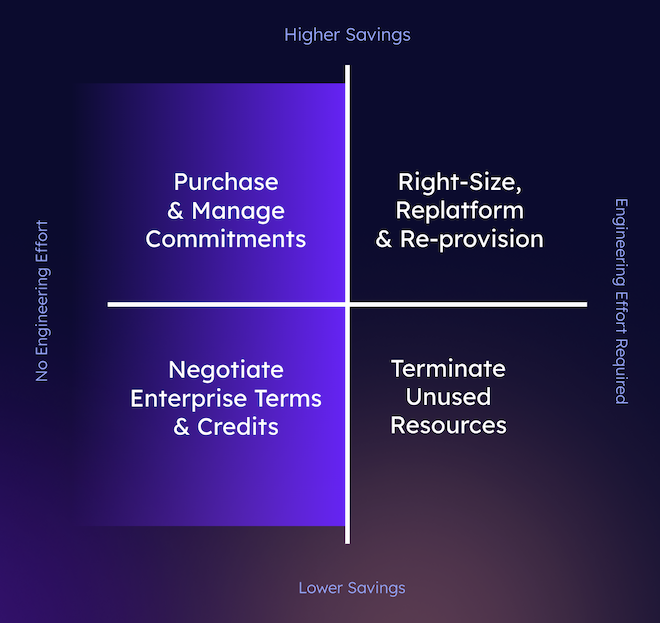
Returning to our four quadrants above - the unshaded areas on the right represent cost savings activities that do NOT fall under the umbrella of Rate Optimization. These are known as “usage optimization” - optimizing how you consume the cloud.Native Rate Optimization Options
Cloud providers offer several native pricing options that can help you optimize your costs:1. Reserved Instances (RIs)
RIs allow you to commit to a specific instance configuration for a term of 1 or 3 years, in exchange for a significant discount compared to on-demand pricing. RIs are suitable for steady-state, predictable workloads.2. Savings Plans
Savings Plans offer a flexible pricing model that provides discounts on your compute usage. By committing to a certain amount of compute usage (measured in dollars per hour) for a 1 or 3-year term, you can receive discounts on EC2, Fargate, and Lambda usage.3. Spot Instances
Spot Instances allow you to bid on spare compute capacity at a discounted rate, often up to 90% lower than on-demand prices. Spot Instances are suitable for interruption-tolerant workloads, such as batch processing, testing, or stateless applications.4. Enterprise Discount Programs (EDP/PPA)
Enterprise Discount Programs / Private Pricing Agreements are offered on an ad-hoc basis to individual organizations based on their historical consumption. While there are no publicly defined guidelines for when an organization may be offered an EDP/PPA, these generally provide high-level discounts off public prices in exchange for multi-year, often multi-million dollar spend commitments.Limitations of Native Options
While these native options offer significant cost savings, they also come with limitations and trade-offs:- Reserved Instances and Savings Plans require long-term commitments, reducing flexibility
- Spot Instances can be interrupted with a 2-minute warning, which may not be suitable for all workloads
- PPAs require significant investment, often with implied growth obligations
How Archera Integrates with Cost Management Tools
Archera works alongside your existing cost management tools to provide comprehensive optimization:AWS Integration
AWS Integration
Cost and Usage Reports (CUR)
- Archera analyzes your CUR data for optimization opportunities
- Identifies underutilized resources and commitment gaps
- Provides recommendations based on detailed usage patterns
- Compare Archera recommendations with Cost Explorer forecasts
- Validate savings projections using historical cost data
- Monitor commitment performance alongside native AWS tools
Azure Integration
Azure Integration
Cost Management + Billing
- Leverages Azure cost data for intelligent recommendations
- Analyzes spending trends and usage patterns
- Integrates with existing budget and alert configurations
- Use Azure Cost Management to track Archera commitment performance
- Compare actual vs projected savings in native dashboards
- Maintain cost governance policies alongside optimization
Google Cloud Integration
Google Cloud Integration
Billing Export Analysis
- Processes GCP billing data for optimization insights
- Identifies CUD opportunities and usage patterns
- Provides BigQuery-compatible cost analysis
- Combine GCP native cost reporting with Archera insights
- Track optimization impact using familiar GCP tools
- Maintain existing cost monitoring workflows
The Archera Advantage
Archera’s platform addresses native commitment limitations by providing:Risk Mitigation
Investment Protection
- Insurance against unused capacity
- Guaranteed savings realization
- Professional management included
Multi-Cloud Strategy
Unified Management
- Single platform for all cloud commitments
- Cross-cloud optimization strategies
- Consolidated reporting and analytics
Transfer Flexibility
Account Mobility
- Transfer commitments between accounts
- Reorganize cloud structure without losing savings
- Support for M&A activities